Wednesday, November 9, 2011

Businees and Academic Report

The purpose of a business report is to present and analyze information. Business reports have 3 main parts that include: the front matter, body, and back matter. In the front matter you have the title page and the table of contents. The body is the main information, and the back matter has end notes and a bibliography. For the format you use default side and bottom margins, and change the top margin to two inches. You also have to use headers and footers to display page numbers, the date, and other information. The title page never has a header or footer.
What are the three main parts of a business report? The three main parts of a business letter include the front matter, the body, and the back matter. What are three guidelines that you should remember when formatting a business report? The three guidelines that you should remember include: using default side and bottom margins, setting the top margin to two inches, and using headers and footers to display the name of the report, the date, etc.
The purpose of an academic report is to present information or to inform. The main parts of an academic research report include the tile and introduction, the body, and the conclusion. Academic reports should have a Works cited page, which lists information for every source that you use to write the report. To do an academic research report in Modern Language Association format you have to follow certain guidelines, those guidelines are: set all margins to one inch, double-space entire report, indent the first line of every paragraph, create a heading, center the title, and right align your last name and the page number in the header.
What information should be displayed in an academic report’s header? In an academic report’s header you must include your name, the name of the class and teacher, and the date in the top left of the page. Why do you think that the MLA recommends double-spacing an academic report? I think we double space so that the report does not look crowded on the page or maybe so that we can edit it easier.
Business and academic reports are the same because they both have two inch top margins, but academic have two inch margins all around. Also, academic reports have to be double-spaced and business reports don't have to be. Academic reports have to be in MLA format, while business letters have their own kind of format.

Thursday, November 3, 2011

Mail Merge

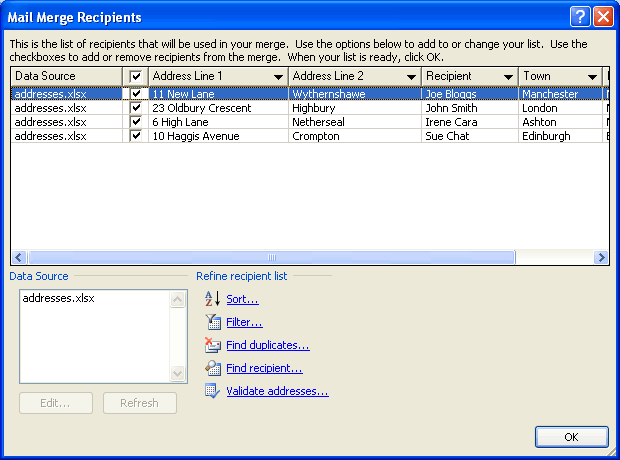
Mail merge allows you to mass produce letters, envelopes, mailing labels, and other documents so that they appear to be personalized. An example of mail merge would be when a company to trying to send letters out to all of its customers. The company would need mail merge so that they don't have to constantly type each letter.

Thursday, October 20, 2011

Business and Personal Letters

A personal business letter is a letter written by an individual to a business or organization. Business and personal letters use almost the same kind of format. The only difference is that personal letters don’t have a header. In block style formatting letters are left-aligned and have 1.15 pt. spacing. The top margin is 2".
1. Block style format is a type of formatting that is left-aligned and the body of the letter is 1.15pt. Line spacing, 10pt. paragraph spacing. The top margin is 2".
2. It is important to format a business letter correctly so that customers can identify a business letter from a personal letter.
3. The formatting of a personal letter is different because they do not have a letterhead like a business letter does.

Wednesday, October 12, 2011

Lesson 2 Tables

     Tables are information put into columns and/or rows. tables are useful when putting in data or other information. You can use them in everyday life when trying to organize your schedule or put in data.Open tables are table without lines and box tables are tables with lines. The most important key used is the TAB key.

Friday, September 23, 2011

Unit 1 lesson 1 Reflection

In Unit 1 I learned about shortvut commands and how they work. They are only on the keyboard, and they're made so that you dont have to use the mouse all the time. There were a few activities we had that required us to use the shortcut commands. I learned how to make column breaks and continuous column breaks too.  In some activities, we used shortcut commands and column breaks together. I also learned how to type a newsletter. I learned how the spacing and how the columns breaks work in a newsleter.

Wednesday, September 7, 2011

The Word Window

     The Word Window has changed very much over the past few years. In the first Word Window there were very few options. Now we have  the zoom scroll bar, font color option, line spacing, and many other things. In 1997 it was very simple and in 2000 it added more functions, and from there the format was constantly changing. The Word Window was plain and simple in 1997, then more functions were added in 2000 such as the tool bar. In 200 the format looked completetly different, and then in 2010 there was a quick access bar.

Friday, September 2, 2011

Shortcut Commands

Shortcut commands are very important. They make it easier for people to type and use a keyboard. Using both a mouse and a keyboard usually slows you down. There are many shortcut commands, but you will probaly only need to memorize a few of them to save you time when you are typing.